Data Transfer Tools#
Use the guide below to compare different UL-LCSB transfer options for your specific use case.
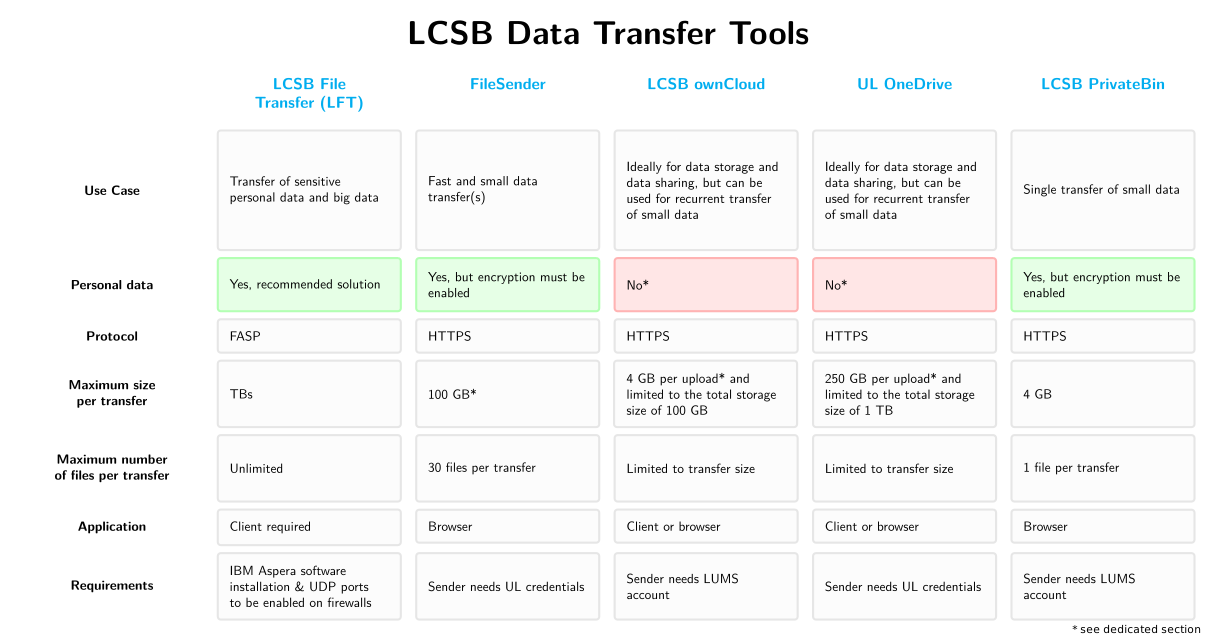 Source code of the image is available in GitLab.
LCSB Large File Transfer (LFT)#
LFT is ideal for transferring large (TBs) and/or sensitive datasets, e.g. whole genome data, transcriptomics data, clinical data, etc. To use LFT, one must install the IBM Aspera software locally and request a data transfer link by creating a dedicated ticket on ServiceNow, which will be handled by one of the LCSB data stewards.
For more information on the usage of LFT, please visit the dedicated How-to Card on LFT.
FileSender#
FileSender is a web-based application for fast, easy, and secure transfer of small files. The tool supports encryption, which must be manually enabled. FileSender is ideal for one-time transfer of sensitive data such as phenotype data.
For more information on the usage of Filesender, please visit the dedicated How-to Card on FileSender.
Note The maximum transfer size is browser dependent. You can upload files of any size up to 100 GB for browsers supporting HTML5 FileAPI. For non-HTML5 browsers the upload limitation is 2 GB.
LCSB ownCloud#
ownCloud is mainly offered as a cloud storage solution managed by LCSB, but can in some cases be used for transferring small data < 4 GB to collaborators. To use ownCloud for data transfers, the sender must have a LUMS account to create a share link, while this is not needed for the recipient, whom can access the share link once granted. To ensure authorized access, the share link should be created with a strong password and time-restriction. The password should then be shared via secure means such as PrivateBin.
Other special use cases when using ownCloud:
- Transfer of sensitive data when LFT is NOT feasible: In this case, ownCloud can be used for transferring sensitive data by archiving the data at rest with a software supporting AES256 encryption. Please see more information on the following How-To Card.
- Recurrent sharing of sensitive data: this use case describes data sharing of sensitive data, in which a cloud cryptor must be used together with ownCloud, e.g. Cryptomator.
UL OneDrive#
As described in the previous section, OneDrive is mainly for data storage and data sharing, which makes OneDrive ONLY ideal when none of the above solutions are possible. To create a transfer, a public link must be created. For personal data the link must be created with a strong password and with time-restriction.
Please refer to Microsoft’s documentation for further information on using expiration dates and passwords.
LCSB PrivateBin#
LCSB PrivateBin is mainly for sharing passwords securely for data access. However, the tool offers the functionality of attaching a file when creating a password link. As PrivateBin is not designed for transferring data, it is only recommended when none of the above is possible.