- Good practice for user management in systems connected to the LCSB SSO
Good practice for user management in systems connected to the LCSB SSO#
This How-to Card explains how identities work in the LCSB Single-Sign-On (SSO) system, how to read the information that is presented to you, and how to make safe, well-informed decisions when granting or requesting access to LCSB applications.
It is intended for everyone who interacts with LCSB applications: end users who log in, application owners and developers who consume identity information, and account managers who decide who has which permissions.
The one-minute summary
- One person may have several accounts (one per Identity Provider). Permissions you grant apply to one account at a time.
- Each account has a unique username that contains a specific suffix (one of:
|ul,|lih,|lums,|ls,|orcid) - A username is not a real-world identity. Always check the suffix (the part after
|). - The suffix tells you which Identity Provider vouches for that account, and therefore how much you can trust the information attached to it.
- When in doubt, ask the user to log in with the account that comes from the most trusted Identity Provider available to them.
The four guiding principles#
Before diving into the details, keep these five summary points in mind. They are at the core of all following explanations.
- Personal responsibility matters. Sharing sensitive information or granting access is always a human decision. The system gives you facts; it does not make the decision for you.
- A username is a label, not an identity. It does not necessarily reflect the real-world identity of the person using it.
- Every account is anchored to one Identity Provider (IdP), recognisable by the suffix at the end of the username. Each IdP has its own level of trust.
- One person, many accounts. A single human being can hold several SSO accounts. Permissions are linked to one specific account, not to the person.
Account information#
When an LCSB application receives a login from the SSO, it gets a small set of information about the user. Not all information pieces are equally suitable for identifying a user inside your application. Some may change, and some may not uniquely identify a single account.
| Field | What it is | Example | Stability | Unique per account |
|---|---|---|---|---|
| User ID | The permanent universal unique identifier (UUID) of the account. | f81d4fae-7dec-11d0-a765-00a0c91e6bf6 |
Permanent | Yes |
| Username | The permanent, human-readable name of the account, including its IdP suffix. | john.doe|ul |
Permanent | Yes |
| The address currently associated with the account. | john.doe@uni.lu |
May change | No | |
| First / Last / Preferred name | The names attached to the account at the moment of login. | John Doe |
May change | No |
Which attribute to use?
The table is ordered from most to least stable. Always identify users in your database by User ID if possible — it is the only attribute other than username that is both permanent and guaranteed to be unique per account. Use username if you need a human readable ID.
What is an Identity Provider?#
An Identity Provider (IdP) is a system that confirms account ownership through an authentication process (usually by entering username/password/2FA). You have probably already used IdPs without thinking about it: every time you click “Sign in with Google”, Google is acting as an IdP for whatever website you are visiting. But beware that in the same way your real world identity was not verified by Google when you created an account, a potential attacker pretending to be someone else also remains unverified. The “Identity” in “IdP” refers to the account details, not your real world identity, even though these can be linked in some cases.
The LCSB SSO does not store your password directly. Instead, when you log in, it forwards you to the IdP you choose, the IdP checks your credentials, and then tells the LCSB SSO whether you are who you claim to be. The following graphic illustrates this process:
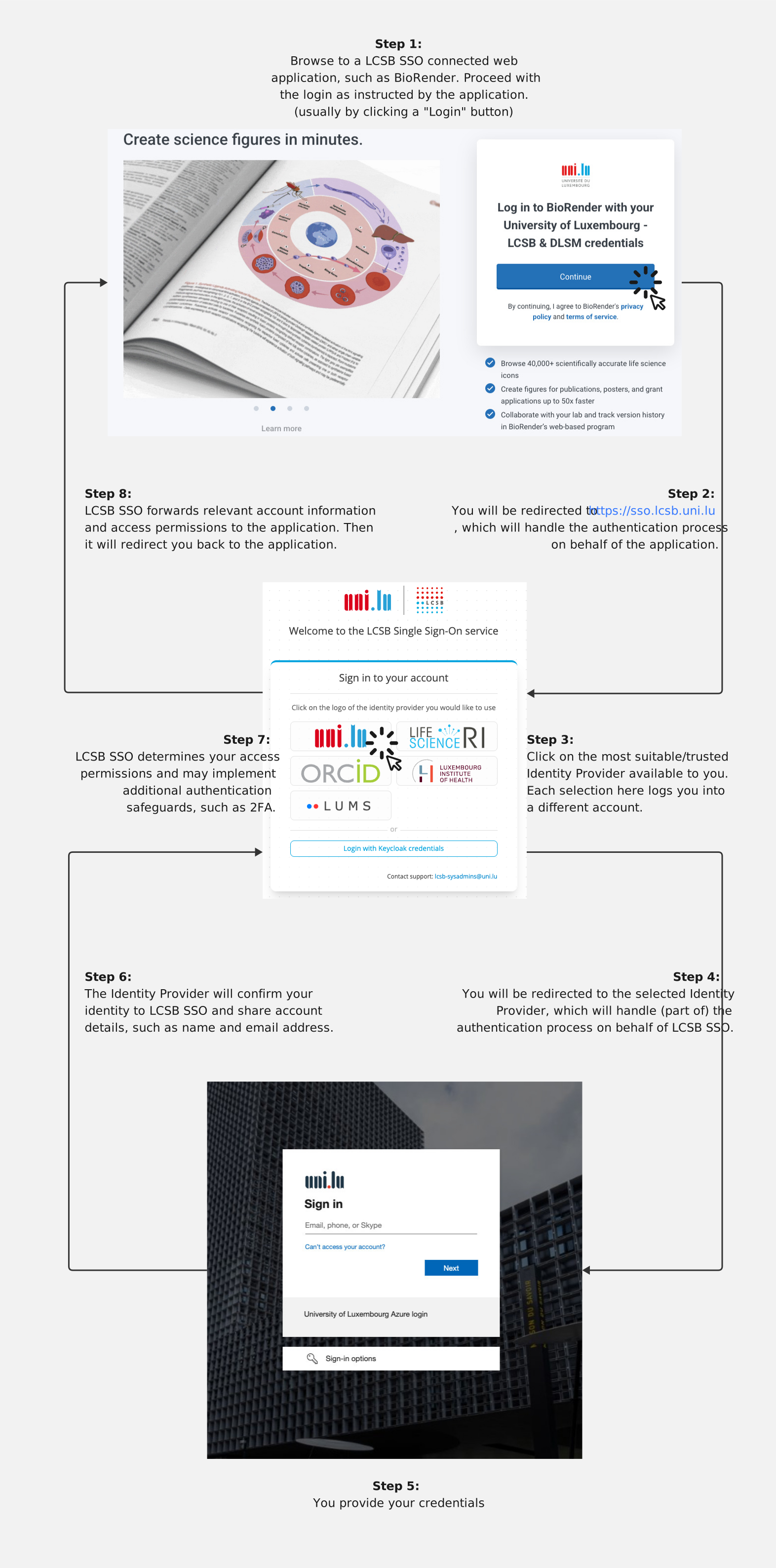
Each time you log in through a different IdP, the LCSB SSO treats it as a different account, even if all the names look the same. This is by design: different IdPs offer different guarantees, and we must not silently merge them.
Username suffixes and their meaning#
The suffix after the pipe character (|) tells you which IdP issued the account.
Assuming a person uses john.doe as their username at every IdP, the LCSB SSO will end up with the following five distinct accounts:
| Username | Identity Provider | Short name |
|---|---|---|
john.doe|ul |
University of Luxembourg | UL |
john.doe|lih |
Luxembourg Institute of Health | LIH |
john.doe|lums |
LCSB User Management System | LUMS |
john.doe|ls |
LifeScience Login (academic federation) | LS |
john.doe|orcid |
ORCID | ORCID |
Same name, different account
john.doe|ul and john.doe|orcid are two completely separate accounts. They might belong to the same person — or they might not. Never assume; always verify.
IdP and their associated trust levels#
Not all IdPs are equally rigorous about checking who their users are. We classify them into four trust tiers. The higher the tier, the more confident you can be that the name and email attached to the account match a real, verified human being.
| Trust level | IdP | Where the trust comes from | What is verified |
|---|---|---|---|
| Highest | UL | The University of Luxembourg’s central administration manages the account. | Identity, name and institutional email are verified by UL administrative procedures. |
| Highest | LIH | The Luxembourg Institute of Health’s central administration manages the account. | Identity, name and institutional email are verified by LIH administrative procedures. |
| High | LUMS | An LCSB account manager personally vouches for the user. | Identity is verified by the local account manager when the account is created. |
| Medium | LS | A research institute may vouch for the user if an institutional email is presented; otherwise self-declared. | Email ownership only, re-verified at least every six months; identity must be established manually unless the institution federates it. |
| Low | ORCID | All information is provided by the user; ORCID does not verify it. | Email ownership only, re-verified at least every six months. |
What “email verification” means
The LCSB SSO does verify that the account holder controls the email address shown. The LCSB SSO does not verify that the name in the email address matches the person’s real-world identity.
In other words: if you see john.doe@gmail.com, you can trust that the person who logged in can read mail at that address. You cannot conclude anything about who they are, because anyone can register that kind of address.
The picture changes when the email is tied to a strong institutional domain (for example @uni.lu, @lih.lu, @embl.de). In those cases, controlling the address is itself a strong signal of identity, because the institution does not hand out addresses to strangers.
Email ownership in the past vs. the present
A subtle but important point: most external IdPs do not notice when a user loses access to the email address attached to their account. ORCID, for example, will happily keep letting someone log in long after their institutional contract has ended and their @uni.lu mailbox has been deactivated — ORCID has no way of knowing.
This is fundamentally different from UL or LIH, where losing your contract means losing your ability to log in, and the information attached to the account is therefore as current as the employment itself.
To close this gap, the LCSB SSO re-verifies email ownership at least every six months for accounts from lesser-trusted IdPs (LS and ORCID). When you see such an account in your application, you can be confident that the user could read mail at that address within the last six months — not necessarily today, but recently enough that stale, long-abandoned addresses are filtered out.
For high-stakes decisions where “recently” is not good enough, request that the user re-authenticate or contact them through a channel you already trust.
Best practice — for users#
Use the most trusted account available to you
If you are a UL staff member, log in with your |ul account whenever possible. If you are an LIH staff member, prefer your |lih account. Only fall back to LUMS, LS, or ORCID when the trusted institutional option is genuinely unavailable.
- Pick one account and use it consistently for the same application. Switching between accounts is treated as switching identity.
- Keep an eye on the suffix when you log in — if you accidentally pick a different IdP, you will land in a different account with different permissions.
- If you have several accounts (e.g.
|ulfor work and|orcidfor cross-institutional collaborations), tell your collaborators which one to use.
Long-term consequences
Using a low-trust IdP when a high-trust one is available may have downstream effects, including the revocation of access permissions that are reserved for verified UL/LIH staff. Always start from the most trusted IdP your situation allows.
Best practice — for application owners and account managers#
Granting access is not just a matter of “is the email familiar?” It is a chain of judgement calls. The questions to ask, in order:
- Which IdP issued this account? (Read the suffix.)
- What does that IdP guarantee? (Look up the trust level.)
- Is the level of trust appropriate for the action being requested? (E.g. read-only access vs. administrative privileges on a sensitive system.)
- Do I need to verify manually? (For low- or medium-trust accounts, especially for sensitive resources, verify the users identity by additional means)
Do not silently merge accounts
If a person owns two accounts (e.g. |ul and |orcid) and asks you to grant the same permissions to both, do not assume both are equally valid. Either grant access only to the high-trust account, or — if both are required — confirm ownership of both accounts directly with the user, ideally over their institutional email.
Be especially careful if your application links accounts by email address or name rather than by User ID. Because email and name are not unique across accounts, this can silently equate two unrelated accounts that happen to share an address or a name — potentially granting a low-trust account the elevated permissions of a verified one without any deliberate decision being made.
Examples#
Example 1 — Same name, same person?#
You would like to grant the UL staff member John Doe access to two applications.
- In application A, you find the username
john.doe|ul. - In application B, you find the username
john.doe|orcid.
Is it safe to grant both accounts access?
Answer:
| Application | Decision |
|---|---|
| A | Yes — UL is the highest trust level. |
| B | Only after confirming ownership with john.doe@uni.lu, and only if the system is not critical. For sensitive systems, insist that the UL account be used in both places. |
Example 2 — Who is this person?#
In your system you see the following account applying for access:
- username:
john.doe|ls - name:
John Doe - email:
john.doe@gmail.com
Do you have enough information to safely identify the user?
Answer: No.
All the information you see is self-declared and unverified. The LCSB SSO has confirmed that the person can read mail at john.doe@gmail.com, but a Gmail address is freely choosable when creating the account; it carries no identity guarantee. You must either contact a known communication channel of the real John Doe to confirm, or refuse the request and ask them to log in via a higher-trust IdP.
Example 3 — Can I only trust UL and LIH?#
In your system you see the following account applying for access:
- username:
john.doe|orcid - name:
John Doe - email:
john.doe@embl.de
Do you have enough information to safely identify the user?
Answer: Yes — most likely.
ORCID is a low-trust IdP, but the LCSB SSO does verify email ownership, and re-verifies it at least every six months. The address john.doe@embl.de belongs to a heavily controlled institutional domain: EMBL does not hand out arbitrary addresses to strangers, and you can be confident that the user could read mail at that address recently (within the last six months). If “the holder of this institutional email” is a sufficient identity proof for your application, you may proceed. For very sensitive operations you should still ask the user to log in via a higher-trust route, since “could read this mail recently” is weaker than “is currently employed by the institution”.
Example 4 — A familiar name with an unfamiliar suffix#
A long-time collaborator who normally logs in as jane.doe|ul suddenly requests access as jane.doe|orcid.
Do you trust the new request?
Answer: Pause and verify. The two accounts may both belong to Jane Doe — or one of them may not. Check with Jane via her institutional email before granting any new permissions, and prefer keeping the existing UL-based access rather than mirroring it onto a low-trust account.
Glossary#
- Account
- A digital record in the LCSB SSO that represents one person as authenticated by one specific IdP. One human being may own several accounts.
- Account manager
- An LCSB member who personally vouches for, and is responsible for, an external user’s LUMS account.
- Email verification
- The process by which the SSO confirms that a person can read messages sent to a given address. For accounts from lesser-trusted IdPs (LS, ORCID), this check is repeated at least every six months, so a verified address means the holder had access to it recently — not necessarily today. It does not confirm the identity of that person.
- Identity Provider (IdP)
- A trusted external system that confirms a user’s identity to the LCSB SSO. UL, LIH, LUMS, LifeScience Login, and ORCID are the IdPs currently supported.
- Keycloak
- The open-source software that powers the LCSB SSO. End users typically do not interact with the name “Keycloak” directly.
- LCSB SSO
- The Single-Sign-On platform operated by the LCSB. It lets users log in once and access many LCSB-connected applications without re-entering their credentials.
- LifeScience Login (LS)
- An academic identity federation widely used in life-science research. Trust depends on whether the user logs in with an institutional account.
- LUMS
- The LCSB User Management System — the LCSB’s own user database.
- ORCID
- A global registry of researchers. It identifies people by a 16-digit number; account information is supplied by the researchers themselves.
- Permission
- The right to perform a specific action in an application (e.g. “read”, “write”, “administer”). Permissions are attached to a single account, not to a person.
- Single-Sign-On (SSO)
- A login method that lets a user authenticate once and then access many applications without logging in again.
- Suffix
-
The text after the pipe character (
|) in a username (e.g. theulinjohn.doe|ul). The suffix identifies the IdP that owns the account. - Trust level
- A label (Highest / High / Medium / Low) indicating how confident you can be in the information attached to an account. The trust level is determined based on our knowledge about the verification processes associated with a given IdP.
- UUID (Universally Unique Identifier)
-
A 128-bit identifier formatted as a string of 32 hexadecimal digits separated by hyphens (e.g.
f81d4fae-7dec-11d0-a765-00a0c91e6bf6). UUIDs are generated in a way that makes collisions practically impossible, making them well suited as permanent, globally unique keys in databases. The LCSB SSO uses a UUID as the User ID for every account. - User ID
- The permanent internal identifier of an account represented as an UUID. The most stable way to refer to an account in your application’s database.
- Username
-
The permanent human-readable name of the account, including the IdP suffix (e.g.
john.doe|ul).
Further help#
If you are unsure how to apply these guidelines to a specific situation — especially before granting elevated permissions or sharing sensitive information — please contact us via Service Now (select Keycloak as application). If you are not UL staff, you can also reach us via lcsb-sysadmins@uni.lu with a description of the case.